So here in the series next lies the top startup of India. Their founders struggle and the perseverance make these startup to stand top in the row. Lets start with the number #1 startup of India. The ranking is taken from startupranking.com
Friday, April 29, 2016

Top 5 Indian IT companies and their founders profiles
In my series of post I am going to share the profiles of top players from various field. Lets start with the very vibrant field of Information Technology.
Tuesday, November 19, 2013
How to get complete information of windows pc
How to get complete information of windows pc!!!

For several reasons one would want to know the information of a computer or laptop based on windows operating system. For example, when someone buys an old pc or laptop, he definately will want to get actual details about that i.e. Physical Memory, Processor, Actual date of Windows installation etc.
So how can he get that????
Here is a simple solution for this problem. Just follow the below steps to get the actual information about the PC or Laptop working on Windows Operating System.
Step 1 : Open cmd (I think all must know how to do it).
Step 2 : Type "systeminfo.exe" (obviously without quotes) and hit Enter.

thats all, my dear friends. When you press enter, you will get all the details about your computer.
Enjoy. Liked it???
Monday, November 18, 2013
How to hide drives in Windows using cmd
How to hide drives in Windows using cmd

We can hide the drives in windows without using any software. There is always some data on our computer which we want to hide from others. So here is the trick by which we can hide the drives and hence the data from My Computer. So nobody will see that in My Computer.
Follow the below steps to hide the drives :-
Step 1 : Open CMD (I hope all can do it easily).
Step 2 : Type “diskpart” (obviously without quotes) and hit Enter.
Step 3 : Now type “list volume” and hit Enter.
Now choose the volume you want to hide
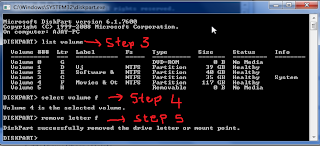

Step 4 : Then type “select volume x” and hit Enter (x is the drive letter you want to hide).
Step 5 : Now type “remove letter x” and hit Enter (x is the drive letter you selected).
Now go to My Computer and you wont find the drive there.
thats all...
If you want to know how to show the drive again, give your e-mail id in comment. I will mail you.
Enjoy.
Saturday, November 16, 2013
Make Laptop a wifi router
How to Make a Laptop act as a wifi router!!!

If you have single Internet Connection at your home and want to share it with other devices like Laptop, Mobile Phones and PCs, then you can easily do this.
Usually, most android phones cannot connect to the WiFi hotspot you make with your windows os. But, with this method you can connect your all mobiles phones, laptops and PCs that have WiFi.
The tool which converts your laptop into wifi router is mHotspot. It is very light weight tool only 700kb.
Follow the below steps to make your laptop act as a WiFi router.\\
Step 1 : Download mHotspot.

Step 2 : Install it.
Step 3 : Enter the Hotspot Name.
Step 4 : Give a password.
Step 5 : Choose the Internet Connection you want to share.
Step 6 : Click on the Start Hotspot button.
thats all... now your laptop is working as WiFi router. You can connect your devices and access internet.
Click here to go to the official website of mHotspot.
Comment if you like.
Wednesday, November 13, 2013
How to block ads in youtube and other websites!!!
How to block ads in youtube and other websites!!!

Friends want to surf the internet without those annoying ads? If yes then there is a very easy way...
We can do this by just installing an add-on in our browser. This add-on is adblock plus.
Adblock Plus blocks annoying ads on the web. It can block other things, like tracking, as well. With more than 50 million users, it is the world's most popular browser extension. Adblock Plus is an open source project created by Wladimir Palant in 2006. Eyeo was founded in 2011 by Wladimir Palant and Till Faida to make its development sustainable.
You can go to this site and can easily install adblock plus in your browser.
Click here to go to the site.
Friends want to surf the internet without those annoying ads? If yes then there is a very easy way...
We can do this by just installing an add-on in our browser. This add-on is adblock plus.
Adblock Plus blocks annoying ads on the web. It can block other things, like tracking, as well. With more than 50 million users, it is the world's most popular browser extension. Adblock Plus is an open source project created by Wladimir Palant in 2006. Eyeo was founded in 2011 by Wladimir Palant and Till Faida to make its development sustainable.
You can go to this site and can easily install adblock plus in your browser.
Click here to go to the site.
How to type in Hindi !!! हिन्दी मे कैसे लिखे !!!
How to type in Hindi !!! हिन्दी मे कैसे लिखे !!!

It is very easy to type in Hindi. You do not have to remember anything or even not practice any thing.
हिन्दी मे लिखना बहुत आसान है! इसके लिये आपको कुछ याद भी नही रखना है और नाही आपको कुछ प्रेक्टिस करना है।
Just go to this link download the tool, Install it press Alt+Shift to toggle between Hindi and English typing.

thats all...
Please Comment, If you like it.
Subscribe to:
Posts (Atom)